
How do I plan a trade with the Long position tool?
Quick answerPick Long position on the left toolbar and click where you would buy. Drag the red stop to where the idea is wrong and the green target to where you would take profit; it shows your R:R.
The details
- Pick Long position on the toolbar on the left.
- Click on the chart where you would buy. Click by the newest candle and it starts at the last price.
- Stop (red): it starts just under the latest swing low. Drag it to where the idea is wrong, like under a recent low or a support level.
- Target (green): it starts at twice your risk. Drag it to where you would take profit, like the next resistance or Last month high.
The lines snap onto levels on the chart, and onto candle highs and lows.
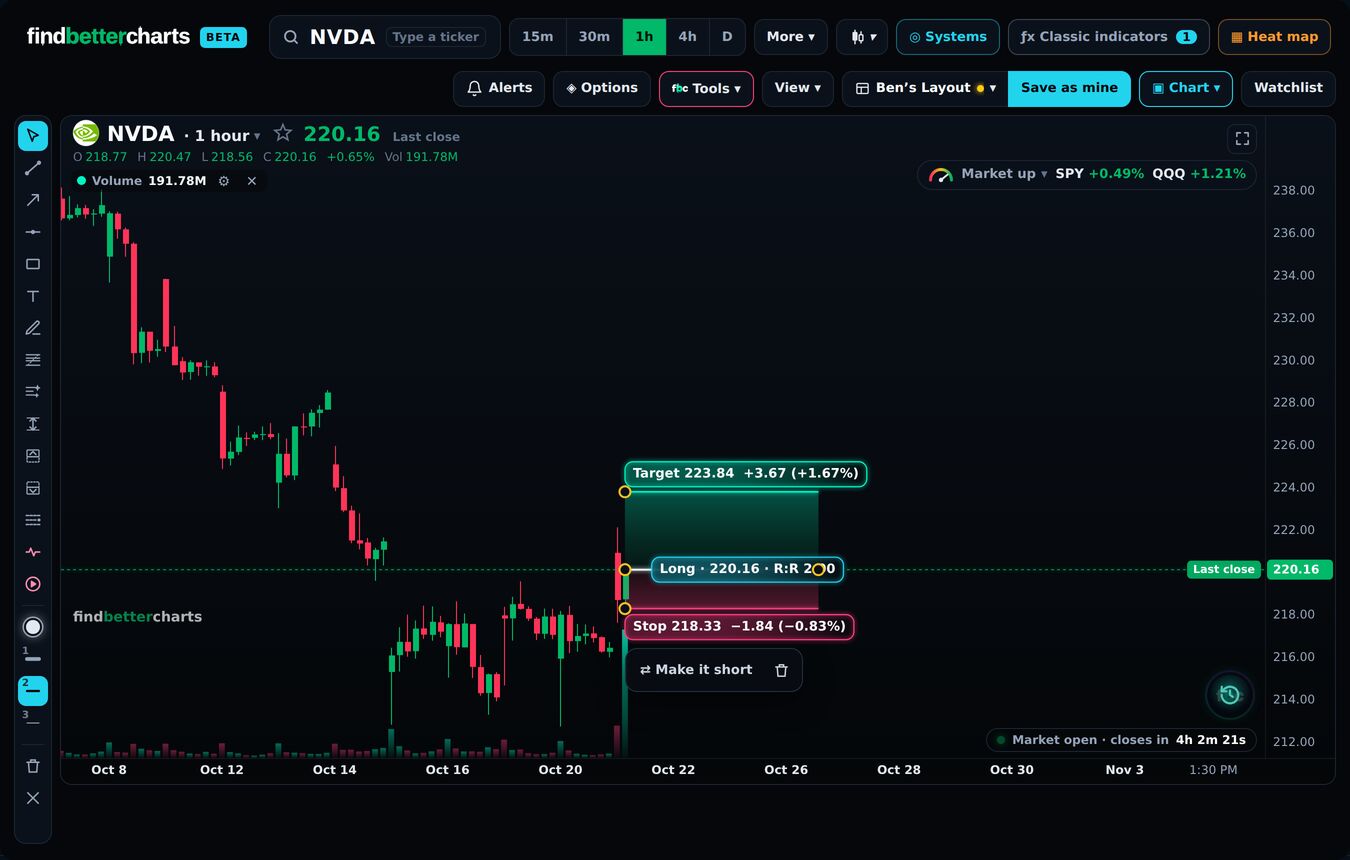
Read the R:R
What you stand to make for each dollar you risk: 2 means two dollars for every one. Under 1, you are risking more than you can make.
Test a setup
Place it on an older candle and it marks whether the target or the stop came first. Select it and press Make it short to plan a short.
Did this answer your question?

Talk to Micheal and the teamMembers: sign in and open Support, and Micheal and the team answer by email. Not a member yet? Email support@findbettertrades.com.